you are here [x]: Scarlet Star Studios > the Scarlet Letters > lsgl: shift F8
<< before
lsgl: walk cycles
after >>
lsgl: scattered today
May 22, 2007
lsgl: shift F8
by sven at 11:59 pm
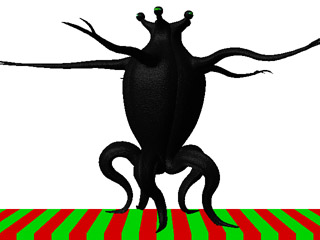
After three days of hitting my head against a wall... Finally the wall LOST!
The big problem was that I was having killer lag. Every time I told LightWave to move an object, it took 13 seconds for the command to execute. I got out my stopwatch and timed it. 13 seconds.
Having figured out that it wasn't a RAM issue, it looked like there were just two options: (1) get my hands on a more powerful CPU, (2) get an updated version of the software with (hopefully) improved algorithms.
I called MacForce to explore the possibility of renting a stronger machine. Rentals are $30 a day, and they don't even have any G5s available. Just checking, I see that G5s start at $2500 -- but the 3Ghz processors I really want are up around $4500. No way... Not for a short film that's probably under 10 minutes long.
I downloaded the demo version of LightWave 9.2 (I'm using 7.5). There was a noticable improvement in speed. Still painful, but conceivably tolerable. But I was getting quite a few mysterious crashes. And furthermore, after doing a test animation in it, I discovered that I can't open the new file in 7.5 -- it's not backwards compatible. That killed it for me.
(I'm sort of relieved... I don't think I want to re-commit to CG just now. Maybe in another year or two, after I've done more with stopmo?)
Early tests with the Elder -- where I only had the legs rigged -- hardly had any lag. Slowly it dawned on me... That means my lag's not a result of the polygons. It's a result of the calculations needed for the IK (Inverse Kinematics) bone chains in the skeleton.
I had everything on full-time IK. By unchecking that option for an IK chain, I found that I could move its goal null around with no lag time at all -- and then just turn IK back on when I had the goal positioned. Cool! So I started looking around for anything else relating to IK...
And there it was: Shift F8.
Click that one magic button, and IK everywhere in the scene turns off. Postion your controllers, easy-peasy. And then turn the IK back on when you want to check your work.
One little magic button. It solved a problem that was making me dizzy with frustration for... Something like 20 hours of work time?
It's like realizing I've been wearing the ruby slippers all this time. ...I dashed back over from the studio and did a little celebratory dance with gl. :-D
And Yet Another New Rig
So, that clip above... I know it looks awful similar to the other ones I've done -- but really there are some big improvements here.
- I resculpted the Elder to give it beefier legs (thanks for the inspiration Markalope!)
- and longer arms... the originals were way too short after being posed in curves
- a bunch of stray polygons and superfluous bones have been eliminated
- this version has fully rigged arms (two elbows each), fingers, and eyestalks
- and the rig actually works
- I've got my list of controllers organized for easy object selection; the items are all grouped, intuitively-named, and color-coded
- the legs keep their proper S-curve as they move
- the bowing of the legs doesn't go beneath ground level
- I've got the problem with feet skating licked
- I think I've got a way to make the legs more sinuous -- by using competing-but-weaker goals (the trick is going to be making them weak enough so that they don't make the feet skate again)
Good Gawd! I think I could actually... um, um, ...ANIMATE with this model!
posted by sven | May 22, 2007 11:59 PM | categories: let sleeping gods lie